Showing posts with label Android. Show all posts

Wednesday, November 21, 2012

Firefox for Android is STILL NOT compatible with Samsung Galaxy Ace

 This is what the Mozilla blog said yesterday about the newly added support for the armv6 processors. You can see that the post clearly mentions the Samsung Galaxy Ace.

But when you head happily to the Play Store to install Firefox you will be greeted by Google saying that the Galaxy Ace is not compatible(See the pic below).

'GT-s5830' is the Samsung's Model Number for Galaxy Ace. Why did this happen when the guys at Mozilla clearly mentions the phone?.

Turns out the guys didn't do their home work on the internals of Galaxy Ace. Firefox for Android added support for ARMV6 but not for phones with RAM less than 512MB. Sadly our Galaxy Ace has only 278MB. It did not meet the minimum requirement and hence is incompatible. See the 'Whats new' section of the Firefox app below.


800MHz was fine with the Ace but 512MB RAM pushed the phone out. But the Galaxy Ace Plus, Ace 2 and Ace Duos users are at luck here.

I hope the guys at Mozilla would promptly lift the RAM requirement and would let use the Best browser available out there.

Tuesday, October 16, 2012

Rooting an android device - What? Why? When? How?

Note: This is a preliminary post for a Guide to rooting Samsung Galaxy Ace

What exactly is rooting?

The diverse dictionary definition of rooting ranges from 'the process of putting forth roots by a plant' to 'cheering' to things I cant even mention here. But to an android user rooting is the process by which we add an extra super-controller to their device so as to drive any part of their device in the way they want.

 The Term rooting came from the Linux world(same place from where android comes) where "Root" is the most powerful user of any system ( Laptops, PCs severs etc). The "Root" user in a Linux system is far more powerful than a windows Administrator.The "Root" user has access and control over every single thing happening in his system. Rooting of an android device essentially hands over the same power to the user. The process of converting a regular user of an android device to a 'root' user is termed 'Rooting'.

In a rooted phone this access to the restricted areas is controlled by an app called 'SuperUser'. This app is the doorman who allows or prevents the access based on your approval. The rooting process adds this app to your existing bank of apps. The "Just Rooted" device looks and functions the same as every other device of the same kind except for the added SuperUser app. So to tap the now gained power you need to install apps specifically designed to avail functions offered by a rooted phone like 'Titanium back up'.

Should you root your phone?

The should

Like I said before it gives access to all the processes in the device. There is nothing unchangeable in a rooted device so to speak. But here are the best advantages.

You can remove preinstalled bloatware - Most annoying of all things is the junk that comes pre-installed with the phone which takes up space and slows down phone. There were apps in my phone which I didnt even used once because good alternatives were available to me. But because of their 'system app' status and therefor non-removability, they sat idly there occupying valuable memory until I rooted my phone.

Free up a lot of space in phone- There are 3 Types of storage memory in an android phone

    1 System Memory - Also called ROM. Where the Android system files are stored. The OS update also goes there so its not completely read only.

    2. Phone Memory - Where your apps are stored. Updates to the system apps like Android Market, google maps, gmail etc also goes to the phone memory. In older android phones this memory was considerably low so users were not free to install lot of apps.

    3 SD Card - Where the user apps are stored if the app is 'movable'. Some popular apps like Facebook does not have this option enabled so they stay in the phone memory with their big foot print(In my phone it occupied 26MB of space out of 150MB which was close to 17% of the available memory)

After rooting, you can move any app to any memory. You can move system app to Phone Memory, move the updates of apps like market and gmail to system memory and move apps to SD card even if movability is not there by default.

You can do complete backups - You can completely back up the system and user apps including the user data. I would recommend Titanium back up for the task. As the user data is also backed up you dont have to set the preferences again if you are restoring. Also you can create Nandroid backups ( Complete System Backup).

Change the looks of your device the way you want

Prevents ads - You can prevent ads from showing up in your phone. But I wont recommend this because considerable time and effort are put in for making every app and in my opinion they should be rewarded for their work.

Fun - Exploring new territories is always fun and if your phone is alredy out of warrenty coverage, you can try rooting to have some fun.

The should NOT

Warranty - "With Great power comes great responsibility". The Super-depth access also means that you can damage the phone pretty easily. delete some essential system file and voila! you got a dead phone. The Manufactures cannot be held responsible for such mis-happenings because we are pushing the system outside of the intended use. So as you root your phone you WILL forfeit your warranty.

Stability Freaks -Don't go there. Rooting reduces the stability of the system so there is a higher chance of crashes and automatic rebooting.

When should you root your phone?

Thats a subjective question . You can try rooting when your 'should root' outweighs 'should NOT'. I rooted my phone once the warranty got expired and the phone memory was reduced to such an extend that i could not install anything without deleting another one and cache files needed to be cleared every day just to avoid low memory warning.

If your phone is under warranty you better not root, because maintenance of an out-of-warranty smart phone is costly.

How to root your phone

Almost every phone has a method to root. Or guys at xda-forum will find a way for that. Mostly it involves starting the phone in recovery mode and applying an update file. This update file is different for every phone hence you need to use the file specific for your phone. Please do a little search and read about experiance of others in rooting their phones.

Sunday, March 18, 2012

How to take screenshots in HTC Explorer without root(Video)

this is a short tutorial on taking screenshots in HTC Explorer, HTCs new addition to the low-midrange section.

You will be using two buttons for taking screenshots in the Explorer. One is the power button located on the top of the phone and the home button located at the left most part of lower touch sensitive buttons.

For capturing a desired screen, you need to hold the power button and then tap the home button. Once the screenshot is taken, there is a camera click sound and the screen mo monetarily whites out. A message 'Screenshot is saved to Camera Shots folder' is also shown. See the video below


Once you press and hold the power button, you have a 2 second window to tap the home button. If you delay, the power options will be displayed and further tapping of the home button won't result in a capture.

You can take screen shots even when the phone is under lock with the same method. Only difference is the absence of visual clues like the whitening of the screen and the message. But the click sound would still be heard and the image will be saved to the same 'Camera Shots' folder.

The captured screens can be viewed by going to the gallery app. You can see all the screenshots in the Camera Shots folder ( see video)

Wednesday, February 22, 2012

Problems with Samsung Galaxy Ace

These are the problems I encountered with the original samsung galaxy ace and their solutions if any

Installation error : couldn't install on USB storage or SD card
  • If you are still using android 2.2 on galaxy ace I strongly recommend an upgrade. Or checkout the above link for a temporary solution for the problem
WiFi error
  • You try to switch the WiFi on but it is stuck in error. WiFi can be switched on only after restarting the phone. This problem is a result of a bug in the part of OS that switches between different types of network. 
  • when you try to switch on WiFi in your phone, it first disables the mobile network. That is 2G/3G. In case of error this switching mechanism WiFi won't be turned on. Chance of error is more if you are having an active transfer in the mobile network. A possible prevention method is to disable mobile data network before you switch Wifi on.
  • A solution was promised with the the 2.3.4 update but the problem recurs now and then. See the video

Heating problem
  • Using WiFi hotspot generates a lot of heat in this phone. I have seen upto 55degrees/131 F. Below are the screen shots showing battery temperature at 50 and 55 degrees at two different occasions.


 These screen shots were taken using ZDBox, a great system management tool
Low total memory and RAM
  • User available memory is only about 130MB in effect. This is completely insufficient to install even a moderate number of apps. 
  • Low RAM results in undue closure of programs during multitasking. But what good it could do when apps like Facebook are using 102MB RAM


Friday, January 20, 2012

Samsung Galaxy Ace Plus Specs comparison with original ace

This is the specs comparison of Samsung Galaxy Ace Plus s7500 ( Announced Jan 2012) with the original galaxy ace s5830( Announced Feb 2011).

Galaxy ace is one of the most successful smartphones from samsung as it delivers greats specs at an affordable price tag. The second in the ace series address some( not all) of the most nagging problems of the original ace had.

Design and dimensions


The new galaxy ace plus s7500 is taller(114.7 vs 112.4 mm), broader  (62.5 vs 59.9mm), thinner (11.2 vs 11.5mm) and a little lighter (111gm vs 113gm) than the original s5830.

Galaxy ace plus doesn't look particularly different from its predecessor except for the camera. The camera has been moved to the center from the side. Also the camera window and flash is now squarer instead of circular in the previous model. On opening the lid it comes clear that the location of the Sim card slot and the camera has been swapped to move it to the center.


The change in shape and location of the camera window spares galaxy ace plus from controversial iphone like look of the original ace.

Another change is the location of micro USB port which has been moved to the bottom in the new model. Also the lid protecting the micro USB port ( which on repeated usage causes damage to bezel) appears to have gone in the galaxy ace plus.

The screen

The screen of galaxy ace plus is a little bigger at 3.65 " compared to the 3.5" of the predecessor. But the resolution remaining the same ( 320 x 480 HVGA), it eventually is a disadvantage to the s7500. The pixel density is dropped to 158 ppi from an already mediocre 165 ppi in the original s5830.

The Processor and Memory

This is where the galaxy ace plus really scores. The processor has been upped to 1Gz (from 800MHz) and the RAM to 512 MB (from 278 MB). The internal memory available to the user has got a very significant boost, from 150MB of user available memory to 3GB of internal memory ( Increased to about 20 times).

The internal memory is divided into two sections. 1GB is dedicated specifically to apps and the rest 2GB is a shared memory for apps, pics and other multimedia files. This means that a hell lot of apps can be installed and you won't need micro SD card mounted to take photos. But I am not sure if the internal memory shows up in USB storage mode because if it doesn't, you will need samsung kies to move your photos (Disadvantage to a Linux user).

While bluetooth has been upgraded to version 3.0, all other connectivity options remain the same.

The phone comes with Gingerbread 2.3 with touchwiz UI layered upon. Given the fate of Samsung Galaxy S with the Ice Cream Sandwich update, I seriously doubt this phone will ever receive one. Samsung also announced that ace plus will be preloaded with full version of Thinkfree document editor, chat on services and usual Google services.

The camera

The camera is completely same as the previous model. It sports a 5 MP auto focus shooter with video recording upto 480p ( VGA recording). There is no secondary camera in galaxy ace plus.

Battery

samsung actually reduced the battery capacity from 1350 mAh on the base model to 1300 mAh in the ace plus. The battery back up on the original ace is considered to be one of the worst(I needs to charge it twice a day). Unless samsung has found a way to use battery in a way more efficient way, it is not going to stand a chance even to its predecessor.

The Price

Samsung is yet to announce a tag to the phone. But it is speculated to be around INR 16,000 ($ 320). This speculation is based on the current price of galaxy ace s5830 in samsung website (Rs 14,600 or $290). 

I think this phone doesn't stand a chance at that range as better spec'd phones ( better resolution (480 x 800), front camera, HD recording, HD playback and better battery among others) are available at a near ( Motorola Defy plus) or lesser( Sony Ericsson Xperia Neo V) price .

Friday, December 30, 2011

Facebook for android 1.8.0 review - Desktop, finally!!

This is the review of Facebook for android 1.8.0 update which was released on December 1st 2011. Facebook app for android was a focus of criticism for long as it lacked the ease of use provided by its desktop counterpart.

Thanks to the developers at Facebook, its android app now looks and walks like its desktop version.

Home

Opening the facebook app still loads the news feed. But there are lot of additions to the previous news feed. The developers have beautifully combined the old newsfeed screen and the Home screen with icons into a new, desktop like interface. See it below.


New Home screen now has Friend Request, message and notifications alert on the top panel as seen in the desktop version. Profile, friends, places, groups, events, facebook chat and photos are included in the top left button with the three horizontal lines.

The entire left panel of the desktop website is included in that one button. The contents are grouped into Favorites, Groups, Pages, lists, Apps (This contains the chat now) and settings.

One additional feature you get with the facebook for android 1.8.0 app is that you can select the type of content you want to see in the news feed. If you are in mood to watch videos, you can choose to view only videos in the news feed. Just click on the button on the top right corner (image on the right), and you will be asked to select the preferred content from all the stories to photos or videos alone.


    Believe me 'Video' is there at the bottom

Chat


Facebook Chat was one of the most non-dependable section of the app previously. It was buggy as hell. It took a lot of time to show availability and many a times availability wouldn't load at all

At first you may think that the chat is removed from the base facebook app as there is a separate messenger app for facebook  now. Location of the chat is now a little deeper. it is located within the left side menu button and at a lower level. Apart from the location, new chat functions, at times, slightly different. If you keep the facebook for android app open long enough, it will load the availability of chat friends in the background which result in snappy loading.

There is no multiple chat option as available in the facebook messenger, but still works good for me.

The "None of your friends are available to chat" error also occur in this version of facebook. But always it was a temporary message and chat loaded within no time.

Friend Requests, Messages and Notifications


These are accessible from the top panel. The number of unattended notifications will be highlighted in red color on the upper right corner of each icon.

Taping on icons open up a small window to view the contents, with the newsfeed in the same place. So you won't have to navigate again if you stopped reading your newsfeed to attend to a notification.

Settings

Now you can set your privacy as well as account settings using the facebook  from the android app itself. All the settings available to a desktop user is available to the app user too. I don't know why they included the privacy settings as separate menu item as it is available in the account settings too.


Photos

With the new update, photos cannot be uploaded to a specific folder which is a big drawback. All the photos will be uploaded to 'Mobile Uploads' folder.

With the newest update you don't need to stop your browsing while an upload is in progress. Uploads will occur automatically in the background and the progress can be viewed in the notification panel. But you won't be able to stop an upload once it starts.

The Drawbacks - RAM, Force closes and Sluggishness

Not everything is neat n' shine with the newest update to the facebook app. The app is a RAM hungry beast. Once I noticed it taking up 55MB of RAM which was quite large even for a desktop app.

Update: The app is determined to break records. It actually reached to a point where it was using about 102 MB of RAM leaving the phone quite laggy. See the video below of the android task manager showing the Facebook app's RAM usage.


I think the app is trying to live upto its new desktop dress in all areas including RAM usage.

There are force closures as usual and sluggishness of the app itself forced me to close the app many a times.

Despite the drawbacks this is one update I would go for. Though it present us some glitches, functionality is improved by a great deal. So, happy facebooking.

Thursday, December 29, 2011

Samsung Galaxy Ace Review Part 2 - The Connectivity

This is the part 2 of the review of samsung galaxy ace phone. This post tests different connectivity options available on the phone including GPRS/EDGE, 3G, WiFi, and GPS.

Download speeds are calculated based on the time required to download a sample 5 MB file from thinkbroadband.com website.

Another speed test was carried out using the speedtest.net's android app

Naming conventions used in this post:
Kbps- Kilo bits per second
KBps - Kilo Bytes per second - 1KBps is equivalent to 8Kbps
I am converting most of the values to KBps because of the ease to understand.

GPRS/EDGE

Galaxy ace is rated class 10 for bot GPRS and EDGE. Class 10 device should be capable to offer speeds upto 8 KBps downloads in GPRS networks and upto  32KBps in EDGE networks.

The Samsung Galaxy Ace was able to provide 4.4 KBps continuous speed in a GPRS only network (GPRS only networks are not a rarity in our country).

In EDGE networks, the phone gave me about 28 KBps average download speed which is very close to the advertised speed. But this was for the downloading of the 5MB file.

The screenshot below was taken during the 5MB download in an EDGE network. You can see that, except for a couple of dips, the download mostly clocks just below 30KBps.


Network speed test using speedtest.org app provided a little bit different result. The numbers were only about 3 KBps in GPRS networks and 22KBps in EDGE networks. However normal browsing followed the speedtest.org's results as it peaked at about 20KBps.

3G

3G networks in India is fairly underpowered. Though speeds upto 21Mbps are in offer, none actually reach that standard in practice.

Network speed in Galaxy ace with 3G networks peaked around 1Mbps which actually is far lower than the theoretical capability of the phone (7.2Mbps). But I think it mostly is due to the limitation of network, not the phone.

WiFi

The phone was very quick to find available connections even when the network available was a new one. Usually I was prompted with the available connections within 10 seconds. But familiar networks were connected within 5 seconds of switching on.

WiFi has a good range too. It maintained at least 1 bar until about 25mtr indoor.

Wifi Error - Wifi wouldn't turn on until you restart. Frequency of this was reduced considerably since the update to android 2.3.4 but still occurs once in a while.
The same problem affects wifi hotspot too. Clicking on Mobile AP box(see below) won't turn on anything.
Bluetooth

Bluetooth in samsung galaxy ace is rated class 2.1+ EDR ( Enhanced data rate) which is capable of transfers upto 262KBps. A closer speed was achieved during my test with a similarly spec-d laptop the transfer speed normally hovered around 230 KBps which I think is not bad.

However transfer speed with another mobile of the same specs was around 100KBps tops. I don't know what made the difference there sure was something.

Bluetooth audio got disconnected at about 8mtrs from the galaxy ace. From this I assume that galaxy ace is equipped with a class 2 bluetooth.

Speed reduces considerably when multiple bluetooth devices are connected to galaxy ace. Transfer speed from my laptop dropped from 230KBps to 150KBps when I started streaming music to my bluetooth stereo headset

GPS

GPS was working without any problem in the original android froyo. It began taking forever to lock after the update to gingerbread 2.3.4.

In the android 2.2 days, without using any additional software I could get a lock within 20 seconds. But after the upgrade 3-4 minutes was usual even under clear sky and if I was travelling, it didn't connect at all.

Then I found a solution to the GPS locking problem on galaxy ace. I installed an app called GPS Status from the Android Market. The app worked like a charm and now GPS is working without any problem.

Note: You won't need data connection to just get a lock on GPS. But A-GPS needs data connection to work as it needs to download location data from the internet. GPS status also needs use of internet connection as it uses A-GPS to improve locking.

I tested GPS in different conditions. The locking time was as follows. (A-GPS was enabled during the test)
Stationary, clear sky - 5 seconds
Stationary, cloudy - 20 seconds
Moving at 60 KMPH, clear sky - 20 seconds

Tethering

USB tethering icon
USB tethering icon on 2.3.4 gingerbread
WiFi Tethering icon

Tethering is a method to channel the mobile data connection to other devices such as laptops. Galaxy ace supports 2 methods for tethering viz, USB and WiFi.

USB and WiFi tethering in galaxy ace is enabled from Settings >> Wireless and connectivity settings >> Tethering and portable hotspot


  You can secure the wifi hotspot by assigning a password. Coverage of WiFi also was good getting similar results as of the Wifi test.

The phone offers a variety of connectivity options and also do justice by living upto expectations.

Wednesday, December 7, 2011

Take screenshots in Samsung Galaxy Ace without rooting (Update: Video)

Screenshots or screen captures allow you to take photo of visible content on a screen. This post describes a method to take screenshots in Samsung Galaxy Ace running on android 2.3.4 without rooting.

Below is a video tutorial for taking screen shots on galaxy ace.


There are a lot of apps in android market that take screenshots and all of them need rooting the phone. But rooting your phone voids the warranty (Checked with the samsung website. Rooting really does void your warranty)
l
Samsung has included in its Galaxy Ace phones a built-in method to capture the screen. This method is different from the stock android method of pressing the power and volume down button together. The stock method is replaced with the new one by the TouchWiz UI.

This built-in method also requires usage of two buttons, the back button which is a touch sensitive one and the Home button which is a hard button(one which needs to be pressed down). For taking the screenshot, you need to hold the back button and then press the Home button.

Three audio-visual clues of screen capture will happen, on a successful attempt. These are a shutter sound, a small graphic appearing from all the sides and notification box displaying "Screen captured. Saved as image file"
You can see the semi transparent white graphic appearing from all the sides and the 'capture successful' message


You can also take screenshots of the lock screen with this method. But there won't be any visual clues. Only the camera click will be present.

The screenshot will be saved to 'ScreenCapture' folder in the memory card. If there is no folder under that name, one will be created. The screenshots will be saved as .png files with date and time of their capture as file name.

But taking screenshot in some apps, like opera mini, is difficult. In these apps, holding the back button will execute the back function and the screen goes back to the previous one - with out the screen shot taken - ultimately closing the app. So you won't be able to take the desired screenshot using the previously described way.

If you want to take screenshots in such apps, you need to press the back button and the Home button at the same time. Pressing both the button at the same time will not execute the back button and the desired screenshot will be captured.

Update : See the comments for another variation

This is a little awkward as one is a touch sensitive button and the other is a hard button, as we have a natural tendency to apply same pressure on both fingers when doing simultaneous press'.

Note: In Samsung galaxy ace running on android 2.2.1, there is no white graphic appearing from the sides, but all other things including the methods are applicable to android 2.2.1 also.

UPDATE : Latest update with samsung galaxy ace- the 2.3.6 version- changed to combination to HOME and POWER button. You can press these buttons together to take screenshots.
The added advantage is that you don't need to worry about getting the back function executed.

Saturday, September 24, 2011

Top 5 widgets for Android 2.2

This is a list of top 5 widgets for samsung galaxy ace running on android 2.2.  All of these are available for free download in the android market.

Widgetsoid2.x

This is the best system widget I have used so far. It brings virtually every setting to the home screen as a toggle widget and is customizable in a lot of ways. Read the full review of widgetsoid2.x.

Battery Widget


Battery indicator of android phones in general and samsung galaxy ace in particular is erroneous.
Battery widget provides a way to see the actual battery power remaining in exact digits rather than assessing from a graphical representation. Read the review of Battery Widget.


Power Control

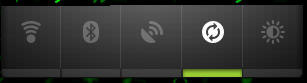
One of the best comes-with-the-box widget of samsung galaxy ace. Power control widget provides easy one click access to GPS, Wifi, Bluetooth, Sync and Scree Brightness.


Program Monitor

This small widget gives info on all opened programs and their processor usage status.


Flashlight

A small widget which enable to use the mobile screen or the flash as a torch light. It is a nice and simple widget that does the job perfectly. 

Friday, September 23, 2011

6 tips on improving battery life of an android phone

Android phones are notorious for their poor battery life. They do the intended job exceptionally well but at a higher cost.

In the Nokia era, a phone lasting 4 or 5 days was a normality than a deviation. We had to think about batteries no more than twice a week. But that golden period of long lasting batteries is gone. Now in the smartphone era a phone which can squeeze the juice to stand a second day is considered relatively good. Android is the most blamed OS among all for its poor battery life.

Best feature of an android ecosystem is its seamless connectivity. Android phones loves to be online. Some might consider it as an agenda being injected to us. But connectivity is the deal of the decade so I don't care, its just freedom for me. Problem with this continuous connectivity is the heavy drain that the connectivity produce on the battery.
The following post is a guide to improving battery life in the least inconvenient way.

Use the android power widget

Power Widget in android 2.2
 Power widget is the most useful widget in terms of power saving in an android phone. The power widget controls Wifi, Bluetooth, GPS, Sync and brightness.
  • Wifi - Switch it on only when you need it. Otherwise it will search for a wifi network every 10 seconds or so. This will dry the battery in a matter of hours.
  • Bluetooth - Not as strong a battery drainer as others but keeping it off will definitely improve battery life
  • GPS - The ultimate battery killer. Never leave it open unless you want a dead battery in 4-5 hrs or less.
  • Account Sync - This syncs all or the chosen account with the server. The power widget toggles the mail sync.
  • Brightness - Controls the brightness in three steps. Lowest one is more than sufficient and is healthy for the eyes in an indoor setting but in outdoors you might need a brighter setting.

Keep the number of home screen widgets to a minimum

Widgets are small snippets of programs that are continuously running in the background. They provide additional information and make easy the use of phone. They are decremental to the battery life as they use the battery whenever there is a need to fetch data to the home screen. 

System widgets like the battery widget will access only the system's internal resources but things like weather widget needs connectivity frequently to fetch the data. So I suggest limiting them to essential minimum. Also keep the update interval to the maximum possible. You don't want to get updated on national news every 5 minutes, do you?

Use a reasonable screen timeout with a soft-key screen turn off button

Keep the automatic screen time out to 5 seconds and you will find yourself getting irritated by repeatedly switching on the screen even during a single task. And every time you turn it back on, you are draining  the battery.  Keep it to 5 minutes and you will find the phone staying far too longer in the 'on' state which also drains battery. How would you tackle this problem?

I suggest keeping the screen timeout to 1 minutes and using a screen turn off button. Make it a reflex to turn off the screen as soon as you complete the task in hand. You can use the Power button (not the widget one, but the actual hard button) for turning the screen off. If you are reluctant to use the hard button for the fear of damaging it with frequent use, I suggest use of an on-screen toggle for screen turn off. You can use widgetsoid2.x to create a screen turn off toggle.

Say NO to task killer

Don't be amazed because use of a task killer will actually decrease your battery life. From 2.x android is very good at task management. The system keeps apps in memory only if it feels a recent requirement. If you kill the app using a task killer, the system has to restart the app from scratch when required which actually puts more pressure on the processor and drains more battery than when it is keep in the memory in idle state.

Use APNDroid - The second power button

APNDroid is a simple but powerful app that turns off the network on a single click. This offers a large boost on the battery life but has the disadvantage of losing connectivity. But as you can get online using the APNDroid toggle button in 3-4 seconds, I think it doesn't matter much.

Airplane mode

I agree that airplane mode is not a normally intended state of cell phone, but if you are in a situation where a call is not allowed, I suggest keeping the phone in this mode. Keeping the phone in airplane mode is almost same as switching it off, but has an advantage of getting back to connected state in seconds.

Use Battery Friendly Apps

Some apps use battery way more than others. Also system upgrades might cause some apps to drain more battery than before. In my case an app, network monitor, drained battery way more quickly when I upgraded my samsung galaxy ace to gingerbread. I suggest you to read reviews carefully before installing an app.
The apps with greatest chance of killing your battery are those that have to be run all the time. For example, anti virus apps. Select ones which causes the least burden on the battery life.

Sunday, September 4, 2011

Solve Error in SMS Unread Count - Android

Scenario 1 :  SMS unread count shown on the SMS app is a wrong number.

Scenario 2 : You got notification for a new SMS, you went to inbox but no message inside inbox bears an unread marking( in red on my samsung galaxy ace). SMS unread counter in the SMS app still showing an unread SMS (number in a red circle). Even if you open up all the threads, the unread count will remain the same.
If another message comes the combined number will be shown unread. If you read the latter the number goes back to the 'stable' one.

Problem: This is an annoying bug in the android OS SMS app. The actual unread message remain hidden in the inbox so opening up the threads and deleting the messages won't work.

Solution: There is a specific free app for resetting the unread message counter developed by Kamosoft.
This app shows the unread messages and lets you mark them as read. The unread counter will be reset.

In my case the app identified the unread message and brought it to the surface. but the counter was showing unread count even after marking it as read. But a restart solved the problem completely. If just marking as read does not solve the problem for you, do a restart and you will be fine.

The reset counter app is completely free and you can download it from the Android Market using the link below.


Reset Unread SMS Counter - Android Market

Tuesday, August 16, 2011

Battery widget for android user review

A perfect definition for battery widget for android would be "A simple battery indicator applet with additional power control options".

The battery widget for android is created by 'geekyouup' and is available for free in the android market. As of writing this, the app is just 55.94kb in size.

Functions

Besides being a good battery level indicator on the home screen occupying only a 1 x 1 space, the app provide additional buttons to control wifi, bluetooth and GPS. The picture below shows the options available for the app shown when you tap on the battery widget on home screen.

Of the above buttons only wifi is a toggle button(wifi on/off button) others are links to their settings menu. Battery button provides link to see which all app used the battery from the point of disconnection from the power source. GPS button opens the location and security settings and BlueTooth button named as BT open up the wireless and network settings.

Battery Use

This app uses negligible battery. There was no apparent difference in battery life with and without battery widget.

Popularity

This is one of the most popular apps in Android market. By the time I am writing this the app has received 99,820 ratings and is at more than 4.5 stars rating.

Compatibility

This app is compatible with almost all android phones including Samsung Galaxy S, galaxy S II, HTC incredible, EVO 3D, galaxy ace etc.


Sunday, July 31, 2011

Widgetsoid - Best free system widget android 2.2 and 2.3

Widgets are one of the greatest features in Android phones. They are small apps designed to work from the home screen. System widgets makes the innards of android phones easily accessible.

Widgetsoid2.x is the system widget I use most. This app provides more toggles and more customizability than any other apps out there. And the best part - its free. Two versions of the app is available in the android market. Widgetsoid and Widgetsoid2.x. the first one is aimed at devices running on android version 1.6 and below. The 2.x is for those running on android 2.0 and up.

The app provides an option to toggle almost every toggleable setting available on android phones.
 
Update:

Complete Feature List of Widgetsoid2.x

These are the complete list of options with their descriptions available on widgetsoid2.x. The list is based on the latest version of widgetsoid2.x ie, 3.2.4

Network
  1. WiFi
  2. Portable Hotspot -Share your internet connection over wifi
  3. Bluetoot
  4. Mobile Data - Toggle mobile internet (2/3/4G)
  5. 2G/3G - Switch between 2G and 3G
  6. 4G - Enable/Disable 4G
  7. Data Sync - Chose whether your online accounts(Gmail, Facebook) needs to be synced with the device or not
  8. Data Sync Now - Force a data synchronization immediately
  9. Tether USB - Share your mobile internet over the USB cable
  10. USB storage - Turn on/off USB storage mode
  11. Airplane - Disconnect all your wireless connections which includes cell coverage bluetooth, wifi, gps, radio
Screen
  1. Screen Timeout -  Two sets of screen timeout options are available. You can either toggle between 15s/1m/5mts or 30sec/2min/5min
  2. Lock Screen - Turn off the display and lock the device
  3. Lock pattern - Change the lock pattern
  4. Auto lock - Doesn't like to unlock the phone everytime?. This options disables the device lock so that you can use the phone right away.
  5. Orientation - Determine whether you want the phone to rotate the screen on device rotation.
  6. Brightness - Switch between brightness levels
  7. Always on - Screen stays on
  8. Stay awake - Screen stay awake when phone is being charged
Sound
  1. Ring Mode - Switch between ring and vibrate
  2. Vibrate - Enable/Disable vibrate
  3. Silent - Silent mode
  4. Speaker - Audio speaker
  5. Volume control - Change volume for media and sounds
  6. Media Scanner - Initiates media scanner to find new files on SD card
  7. Previous - Previous song
  8. Play/Pause - 
  9. Next - Next song
Other
  1. GPS
  2. Battery - Level meter
  3. Temperature - Battery temperature not the climate one
  4. Phone memory - Available phone memory
  5. SD memory - 
  6. RAM memory
  7. Flashlight - use the flash as a continuous light
  8. SD card - Mount/unmount SD Card
  9. Lock Buttons - Lock for widgetsoid widget
  10. Reboot - Reboot phone - requires root
  11. Locale - Change the locale of the phone
  12. Debut USB - Phone will change the mode to Debug upon connection with a computer
Shortcuts
  1. Application - 
  2. Contact - Call/SMS/email a contact
  3. Bookmark
  4. Tasker task - needs tasker to be installed
Some of the switches have further customizations avilable in the global preferences. For example The sub-settings in Mobile Data toggle will allow you to select the method with which the widgetsoid disables the data. You can use APN toggle, APN rename or Root toggle for disabling the mobile data network.

Extensive customization options to tweak the appearance of the widgets are also available in widgetsoid. And it performed well on every task I throw at it . Overall I think widgetsoid2.x is the best system widget available for android platform.

Saturday, July 2, 2011

Facebook for android 1.6.0 review

This is the review of the newest update of Facebook app for android. Facebook for android is an official app developed by the facebook development team and is available for free in the android market.

The app from the official source is always expected to be the best one. But here the case is different. The newest update actually made the app a disabled one. Many of the sections that worked fine previously in the 1.5.x version went completely rogue on the latest version

HOME SCREEN

Home screen in facebook for android is almost similar to the one in previous edition. Home screen provides access to the 9 sections and provide you with a scroll of graphics (photos and videos ) in your news feed.

NEWS FEED


  The interesting addition to the news feed section is the ability to upload videos . Uploading videos is done by clicking the camera icon on the second line. The top right button on the news feed screen now lets you select the type of information you want to be displayed on the screen. All of these were good intentions but a crappy code for the implementation of the functionality drove the facebook app to a ditch.

News feed now refreshes constantly every 2 or so seconds if we select anything other than videos and in the latter case nothing loads at all.

UPDATE: News feed is now working fine but videos are still in dark. The news feed is equipped with continuous scrolling which is kinda good because it loads additional items automatically when you near the end of list.
UPDATE 2 : App crashes many a times when trying to download the news feed. The newest update of 1.6.1 also didn't fix this.

CHAT

Chat is the worst part of the new update. Most of the time the chat keeps on loading like forever and finally will say "none of your friends are available to chat" or connection terminated. The no friend thing was always false when I cross checked on my desktop browser.

Another bug in the chat function is the reappearance of active conversations even after I closed it long time ago. I had three conversations currently in that section one of which actually ended 2 weeks ago ( on the previous version) and I have been trying to close it since then.

There was only one successful chat after the current update and this too had many glitches. Posts will appear to be published for sometime and then will vanish mysteriously, without the person at the other end ever seeing it.

One 'dangerous' bug in the program is the swap of the posts. ie, posts intended for one person went to another. This happened to me only once but could have created potentially serious complications so I decided not to use chat until an update is available.

UPDATE:  The newest update 1.6.1 resolved most of the previous problems but created new ones. Some times when I am chatting with another person, what I write come in chat screen and what he replies will come in messages section.

FRIENDS REQUEST

In the previous edition, confirming a friend request gave an acknowledgment 'confirmed'. But in the new edition it is shown as 'Ignored'. When I first saw this I thought I mistakenly clicked the reject button. When I opened the desktop to send a request, I saw the person as my friend. This again happened one day later which confirmed the bug.

SPEED

The app now is slower than the mobile version of facebook which offer a slightly less featured 'social network'. Also the desirability of the content decreased as most of the items on the wall now contains 'x' is now friends with 'Y' and 10 others (on my last visit 11 out of first 20 posts were in this class). I virtually had no use with these posts as friend finder is a very good at justifying its name.

MESSAGES

Messages have a good addition as 'to be replied' messages are now marked, so you would know whom to message.

NOTIFICATIONS

You can now set notifications for messages, friend requests and invites. Messages includes both chats and messages and the notification comes only like' you have 2 messages'. Usually clicking on the notification will lead to chat or messages directly. But there were occurrences of appearance of notification without the arrival of any new message or chat.

UPDATE : The notification is more a menace now than a help. What would you expect to happen when you click on a notification item about a new message?. Open app in the correct section ( Chat or message) and show you the message. right?. There is the twist, 4 out of 5 notifications opened nothing. No program opening, no showing the chat, nothing. Just the notification item disappeared thats all.


CONCLUSION

When I downloaded facebook for android for the first time it was an app with 4.5 stars but at the time of writing this it has dipped tot 3.5 because of a large number of negative reviews(One starred ) on the current version. The app now look like an alpha version of the new interface( Its quality is definitely below beta). If the facebook developers do not wake up, the app will end up with 2 or 3 stars by the time they roll out a bug fixed release.

UPDATE: the 1.6.1 version didn't address many of the problems people pointed out about the previous version. They just added some more half baked functions. Is facebook abandoning Andriod platform?.  Android reached 550,000 activations per day by july 14 2011. How can they ignore a platform on which a million devices are activated every other day?. Or is it facebook just going away from what is potentially going to be a Google + territory?

UPDATE 2: 1.6.2 app was one of the best in series with apparently no issues in most phones. The app raised the star rating  to 3.5. But the newest release of facebook for android 1.6.3 proved to be a disaster again. So any one in 1.6.2 please stay there. And update only after reading the latest app reviews from market.